
Appearance
Maven 构建配置文件
1. 概述
构建配置文件是一系列的配置项的值,可以用来设置或者覆盖 Maven 构建默认值。
使用构建配置文件,你可以为不同的环境,比如说生产环境(Production)和开发(Development)环境,定制构建方式。
配置文件在 pom.xml 文件中使用 activeProfiles 或者 profiles 元素指定,并且可以通过各种方式触发。配置文件在构建时修改 POM,并且用来给参数设定不同的目标环境。比如说:开发(Development)、测试(Testing)和生产环境(Production)中数据库服务器的地址。
关于 Maven Profiles 更详细的说明可以参考:Maven 官网。
2. 构建配置文件的类型
构建配置文件大体上有三种类型:
| 类型 | 在哪定义 |
|---|---|
| 项目级(Per Project) | 定义在项目的 POM 文件 pom.xml 中 |
| 用户级(Per User) | 定义在 Maven 用户的设置 xml 文件中 (%HOMEPATH%/.m2/settings.xml) |
| 全局(Global) | 定义在 Maven 全局的设置 xml 文件中 (%MAVEN_HOME%/conf/settings.xml) |
3. 配置文件激活
Maven 的构建配置文件可以通过多种方式激活。
- 使用命令控制台输入显式激活;
- 通过 Maven 设置;
- 基于用户属性;
- 操作系统设置(比如说:Windows 系列);
- 文件的存在或者缺失;
3.1. 配置文件激活实例
假定项目结构如下:
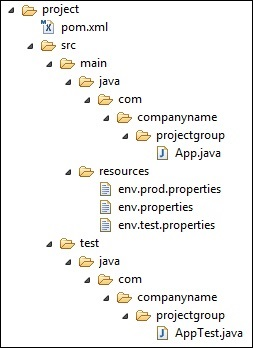
其中在 src/main/resources 文件夹下有三个用于测试文件:
| 文件名 | 描述 |
|---|---|
env.properties | 如果未指定配置文件时默认使用的配置 |
env.test.properties | 当测试配置文件使用时的测试配置 |
env.prod.properties | 当生产配置文件使用时的生产配置 |
Note
- 这三个配置文件并不是代表构建配置文件的功能,而是用于本次测试的目的;比如,我指定了构建配置文件为
prod时,项目就使用env.prod.properties文件;- 下面的例子仍然是使用 AntRun 插件,因为此插件能绑定 Maven 生命周期阶段,并通过 Ant 的标签不用编写一点代码即可输出信息、复制文件等,仅此而已。其余的与本次构建配置文件无关;
3.1.1. 通过命令参数激活
profile 可以让我们定义一系列的配置信息,然后指定其激活条件。这样我们就可以定义多个 profile,然后每个 profile 对应不同的激活条件和配置信息,从而达到不同环境使用不同配置信息的效果。
以下实例,我们将 maven-antrun-plugin:run 目标添加到测试阶段中。这样我们可以在不同的 profile 中输出文本信息。我们将使用 pom.xml 来定义不同的 profile,并在命令控制台中使用 Maven 命令激活 profile。
pom.xml 文件如下:
XML
<project xmlns="http://maven.apache.org/POM/4.0.0" xmlns:xsi="http://www.w3.org/2001/XMLSchema-instance"
  xsi:schemaLocation="http://maven.apache.org/POM/4.0.0 http://maven.apache.org/maven-v4_0_0.xsd">
  <modelVersion>4.0.0</modelVersion>
  <groupId>com.jsoft.test</groupId>
  <artifactId>testproject</artifactId>
  <packaging>jar</packaging>
  <version>0.1-SNAPSHOT</version>
  <name>testproject</name>
  <url>http://maven.apache.org</url>
  <dependencies>
    <dependency>
      <groupId>junit</groupId>
      <artifactId>junit</artifactId>
      <version>3.8.1</version>
      <scope>test</scope>
    </dependency>
  </dependencies>
  <profiles>
      <profile>
          <id>normal</id>
          <build>
              <plugins>
                 <plugin>
                    <groupId>org.apache.maven.plugins</groupId>
                    <artifactId>maven-antrun-plugin</artifactId>
                    <version>1.8</version>
                    <executions>
                       <execution>
                          <phase>test</phase>
                          <goals>
                             <goal>run</goal>
                          </goals>
                          <configuration>
                          <tasks>
                             <echo>Using env.properties</echo>
                             <copy file="src/main/resources/env.properties" tofile="${project.build.outputDirectory}/env.properties" overwrite="true"/>
                          </tasks>
                          </configuration>
                       </execution>
                    </executions>
                 </plugin>
              </plugins>
          </build>
      </profile>
      <profile>
          <id>test</id>
          <build>
              <plugins>
                 <plugin>
                    <groupId>org.apache.maven.plugins</groupId>
                    <artifactId>maven-antrun-plugin</artifactId>
                    <version>1.8</version>
                    <executions>
                       <execution>
                          <phase>test</phase>
                          <goals>
                             <goal>run</goal>
                          </goals>
                          <configuration>
                          <tasks>
                             <echo>Using env.test.properties</echo>
                             <copy file="src/main/resources/env.test.properties" tofile="${project.build.outputDirectory}/env.properties" overwrite="true"/>
                          </tasks>
                          </configuration>
                       </execution>
                    </executions>
                 </plugin>
              </plugins>
          </build>
      </profile>
      <profile>
          <id>prod</id>
          <build>
              <plugins>
                 <plugin>
                    <groupId>org.apache.maven.plugins</groupId>
                    <artifactId>maven-antrun-plugin</artifactId>
                    <version>1.8</version>
                    <executions>
                       <execution>
                          <phase>test</phase>
                          <goals>
                             <goal>run</goal>
                          </goals>
                          <configuration>
                          <tasks>
                             <echo>Using env.prod.properties</echo>
                             <copy file="src/main/resources/env.prod.properties" tofile="${project.build.outputDirectory}/env.properties" overwrite="true"/>
                          </tasks>
                          </configuration>
                       </execution>
                    </executions>
                 </plugin>
              </plugins>
          </build>
      </profile>
   </profiles>
</project>上面新建了三个 profile,其中 id 区分了不同的 profile 执行不同的 AntRun 任务,三个任务都监听了 Maven 的 test 生命周期阶段,当 Maven 执行 test 时,就触发了 AntRun 的任务,任务执行输出文本并复制文件到指定的位置。而至于要执行哪个 AntRun 任务,此时构建配置文件起到了传输指定的作用,比如,通过命令行参数输入指定的 id。
执行命令:
Bash
$ mvn test -P testNote:第一个
test为 Maven 生命周期,第 2 个test为构建配置文件指定的id参数,这个参数通过-P来传输,当然,它可以是prod或者normal这些由你定义的id。
运行的结果如下:

可以看出成功的触发了 AntRun 的任务。并且是对应构建配置文件下的 id 为 test 的任务。
再测试其余两个命令,结果如下:


3.1.2. 通过 Maven 配置文件激活
打开 %HOMEPATH%/.m2 目录下的 settings.xml 文件,其中 %HOMEPATH% 代表用户主目录。如果 setting.xml 文件不存在就直接拷贝 %MAVEN_HOME%/conf/settings.xml 到 .m2 目录,其中 %MAVEN_HOME% 代表 Maven 的安装目录。
配置 setting.xml 文件,增加 activeProfiles 属性:
XML
<settings xmlns="http://maven.apache.org/POM/4.0.0"
   xmlns:xsi="http://www.w3.org/2001/XMLSchema-instance"
   xsi:schemaLocation="http://maven.apache.org/POM/4.0.0
   http://maven.apache.org/xsd/settings-1.0.0.xsd">
   ...
   <activeProfiles>
      <activeProfile>test</activeProfile>
   </activeProfiles>
</settings>执行命令:
Bash
$ mvn testNote
- 此时不需要使用
-P test来输入参数了,上面的setting.xml文件的activeprofile已经指定了test参数代替了;- 同样可以使用在
%MAVEN_HOME%/conf/settings.xml的文件进行配置,效果一致;
3.1.3. 通过用户属性激活
先把上一步测试的 setting.xml 值全部去掉。
然后在 pom.xml 里面的 id 为 test 的 profile 节点,加入 activation 节点:
XML
<project xmlns="http://maven.apache.org/POM/4.0.0" xmlns:xsi="http://www.w3.org/2001/XMLSchema-instance"
  xsi:schemaLocation="http://maven.apache.org/POM/4.0.0 http://maven.apache.org/maven-v4_0_0.xsd">
  <modelVersion>4.0.0</modelVersion>
  <groupId>com.jsoft.test</groupId>
  <artifactId>testproject</artifactId>
  <packaging>jar</packaging>
  <version>0.1-SNAPSHOT</version>
  <name>testproject</name>
  <url>http://maven.apache.org</url>
  <dependencies>
    <dependency>
      <groupId>junit</groupId>
      <artifactId>junit</artifactId>
      <version>3.8.1</version>
      <scope>test</scope>
    </dependency>
  </dependencies>
  <profiles>
      <profile>
          <id>normal</id>
          <build>
              <plugins>
                 <plugin>
                    <groupId>org.apache.maven.plugins</groupId>
                    <artifactId>maven-antrun-plugin</artifactId>
                    <version>1.8</version>
                    <executions>
                       <execution>
                          <phase>test</phase>
                          <goals>
                             <goal>run</goal>
                          </goals>
                          <configuration>
                          <tasks>
                             <echo>Using env.properties</echo>
                             <copy file="src/main/resources/env.properties" tofile="${project.build.outputDirectory}/env.properties" overwrite="true"/>
                          </tasks>
                          </configuration>
                       </execution>
                    </executions>
                 </plugin>
              </plugins>
          </build>
      </profile>
      <profile>
          <id>test</id>
          <activation>
            <property>
               <name>env</name>
               <value>test</value>
            </property>
          </activation>
          <build>
              <plugins>
                 <plugin>
                    <groupId>org.apache.maven.plugins</groupId>
                    <artifactId>maven-antrun-plugin</artifactId>
                    <version>1.8</version>
                    <executions>
                       <execution>
                          <phase>test</phase>
                          <goals>
                             <goal>run</goal>
                          </goals>
                          <configuration>
                          <tasks>
                             <echo>Using env.test.properties</echo>
                             <copy file="src/main/resources/env.test.properties" tofile="${project.build.outputDirectory}/env.properties" overwrite="true"/>
                          </tasks>
                          </configuration>
                       </execution>
                    </executions>
                 </plugin>
              </plugins>
          </build>
      </profile>
      <profile>
          <id>prod</id>
          <build>
              <plugins>
                 <plugin>
                    <groupId>org.apache.maven.plugins</groupId>
                    <artifactId>maven-antrun-plugin</artifactId>
                    <version>1.8</version>
                    <executions>
                       <execution>
                          <phase>test</phase>
                          <goals>
                             <goal>run</goal>
                          </goals>
                          <configuration>
                          <tasks>
                             <echo>Using env.prod.properties</echo>
                             <copy file="src/main/resources/env.prod.properties" tofile="${project.build.outputDirectory}/env.properties" overwrite="true"/>
                          </tasks>
                          </configuration>
                       </execution>
                    </executions>
                 </plugin>
              </plugins>
          </build>
      </profile>
   </profiles>
</project>执行命令:
Bash
$ mvn test -D env=testNote:上面使用
-D传递用户属性,其中env对应刚才设置的name值,test对应value。
3.1.4. 通过 JDK 版本激活
在下面这个示例中,当 JDK 版本以 1.4 开头时(例如:1.4.0_08、1.4.2_07、1.4)它将激活该 profile。不过需要注意的是,当 JDK 版本不是以 1.4 开头,即便该版本比 1.4 还新,例如:1.8 或者 11 它都不会激活该 profile:
XML
<profiles>
  <profile>
    <activation>
      <jdk>1.4</jdk>
    </activation>
    ...
  </profile>
</profiles>在 Maven 2.1 版本及之后,可以使用版本范围语法来指定某一范围内的 JDK 版本,例如:
XML
<profiles>
  <profile>
    <activation>
      <jdk>[1.3,1.6)</jdk>
    </activation>
    ...
  </profile>
</profiles>3.1.5. 通过操作系统激活
当 activation 元素包含下面的操作系统信息,则在系统为 Windows XP x86 时,test profile 将会被触发。
XML
<profile>
   <id>test</id>
   <activation>
      <os>
         <name>Windows XP</name>
         <family>Windows</family>
         <arch>x86</arch>
         <version>5.1.2600</version>
      </os>
   </activation>
</profile>如果当前的操作系统为 Windows XP x86,则现在打开命令控制台,跳转到 pom.xml 所在目录,并执行下面的 mvn 命令。不用使用 -P 选项指定 profile 的名称。Maven 将显示 test 的 profile 被激活。
Bash
$ mvn test3.1.6. 通过文件的存在或者缺失激活
在下面这个例子中,当 target/generated-sources/axistools/wsdl2java/com/companyname/group 缺失时,test profile 将会被触发。
XML
<profile>
   <id>test</id>
   <activation>
      <file>
         <missing>target/generated-sources/axistools/wsdl2java/com/companyname/group</missing>
      </file>
   </activation>
</profile>
现在打开命令控制台,跳转到 pom.xml 所在目录,并执行下面的 mvn 命令。不用使用 -P 选项指定 profile 的名称。Maven 将显示 test 的 profile 被激活。
Bash
$ mvn test