
Appearance
.NETCore Runtime 源码编译
1 编译步骤
操作步骤与 aspnetcore 源码编译类似,以下以 v6.0.0 版本为例进行操作:
先把仓库通过 Git 拉到本地
参考官网的编译指南:
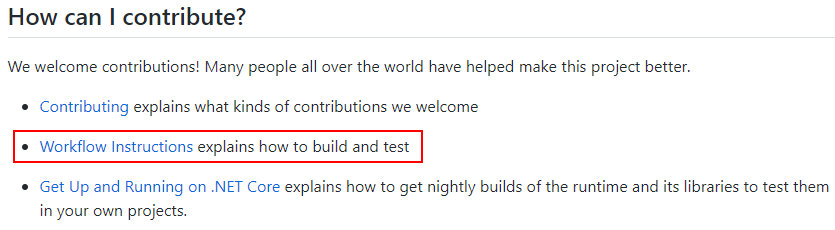
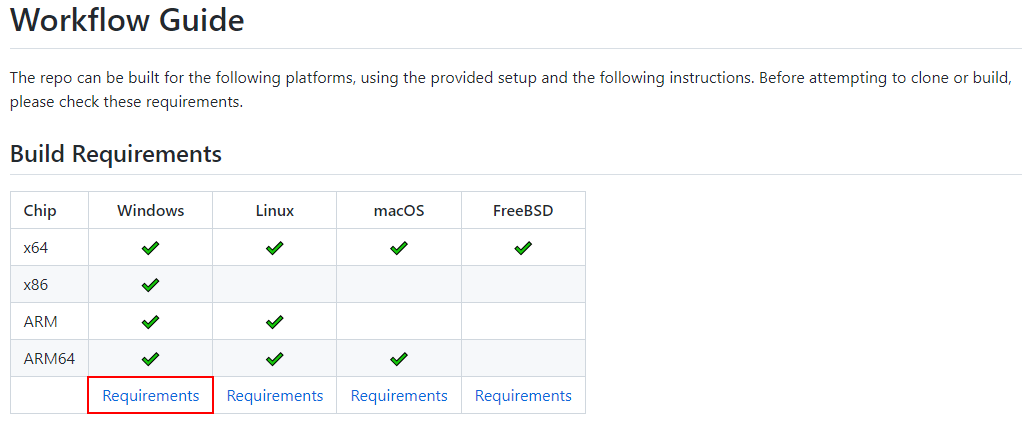
安装编译所需的相关工具:
配置下 Git 支持长文件名
git config --system core.longpaths true安装 Visual Studio 所需的相关组件,打开 Visual Studio Installer,“更多”,“导入配置”,选择 Git 仓库根目录下的
.vsconfig文件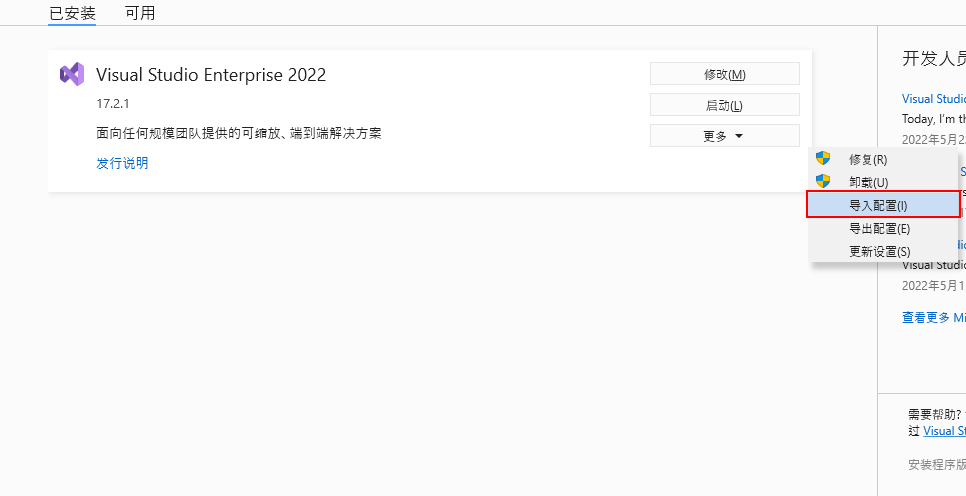
根据指示安装 CMake、Ninja、Python 等工具,并配置好相关的环境变量
切换 Git 仓库到指定版本的 Tag(如:v6.0.5)
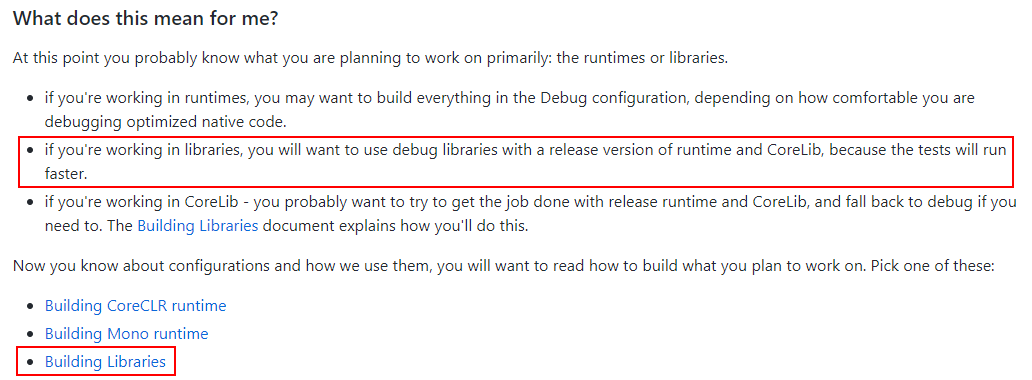
因为我们实际上只是想要编译 extensions 相关的包而已,根据以下提示,发现我们只需要编译 debug 版本的 libraries 以及 release 版本的 runtime 和 CoreLib 就行了:
切换到根目录执行
./build.cmd -rc Release命令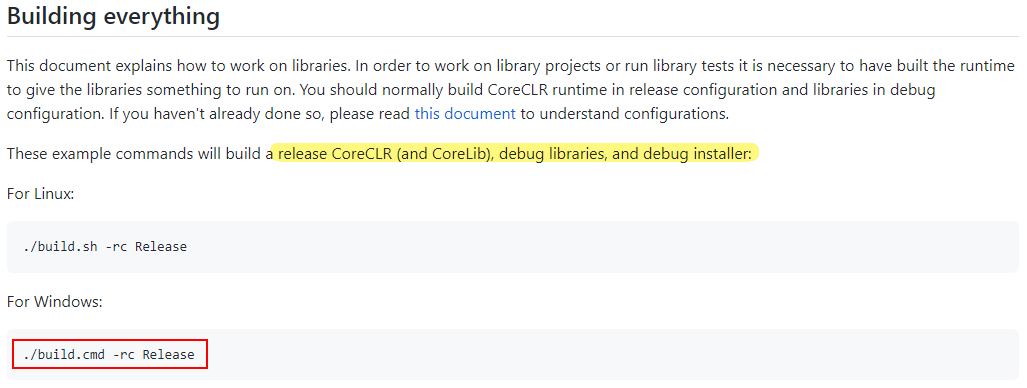
此时它会先去下载
dotnet-sdk-6.0.100-rc.1.21430.12-win-x64.zip,而微软 SDK 下载官网没有对应的 rc 版本可以下载。所以我们可以用老办法改global.json里面申明的 SDK 版本,先去 SDK 下载官网拿到下载链接后再修改dotnet-install.ps1文件替换下载链接。或者直接用下载工具把文件下载到本地并将其放到对应的文件夹下。这里我们以后面这种方法为例: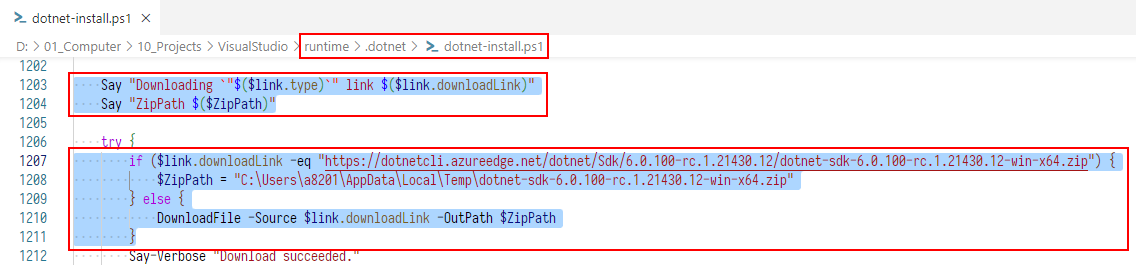 PowerShell
if ($link.downloadLink -eq "https://dotnetcli.azureedge.net/dotnet/Sdk/6.0.100-rc.1.21430.12/dotnet-sdk-6.0.100-rc.1.21430.12-win-x64.zip") { $ZipPath = "C:\Users\a8201\AppData\Local\Temp\dotnet-sdk-6.0.100-rc.1.21430.12-win-x64.zip" } else { DownloadFile -Source $link.downloadLink -OutPath $ZipPath }重新执行
./build.cmd -rc Release,出现如下错误:TextC:\Users\a8201\.nuget\packages\microsoft.dotnet.build.tasks.installers\6.0.0-beta.21522.3\build\acquisition\acquire-wix\acquire-wix.proj(22,5): error MSB4018: “DownloadFile”任务意外失败。 ...根据提示,我们找到
acquire-wix.proj文件,并找到DownloadFile节点,在上方添加:XML<Message Importance="High" Text="### 1 Downloading from '$(WixDownloadUrl)' to '$(WixDestinationPath)'" /> <Message Importance="High" Text="### 1 Unzipping from '$(WixDestinationPath)' to '$(WixToolsDir)'" />再次执行
./build.cmd -rc Release,错误依旧,不过此时会增加输出提示 “### 1 Downloading …”、“### 1 Unzipping …”。我们先根据下载链接把文件下载到本地,并将该文件复制一份到目标路径下,然后再次修改acquire-wix.proj文件: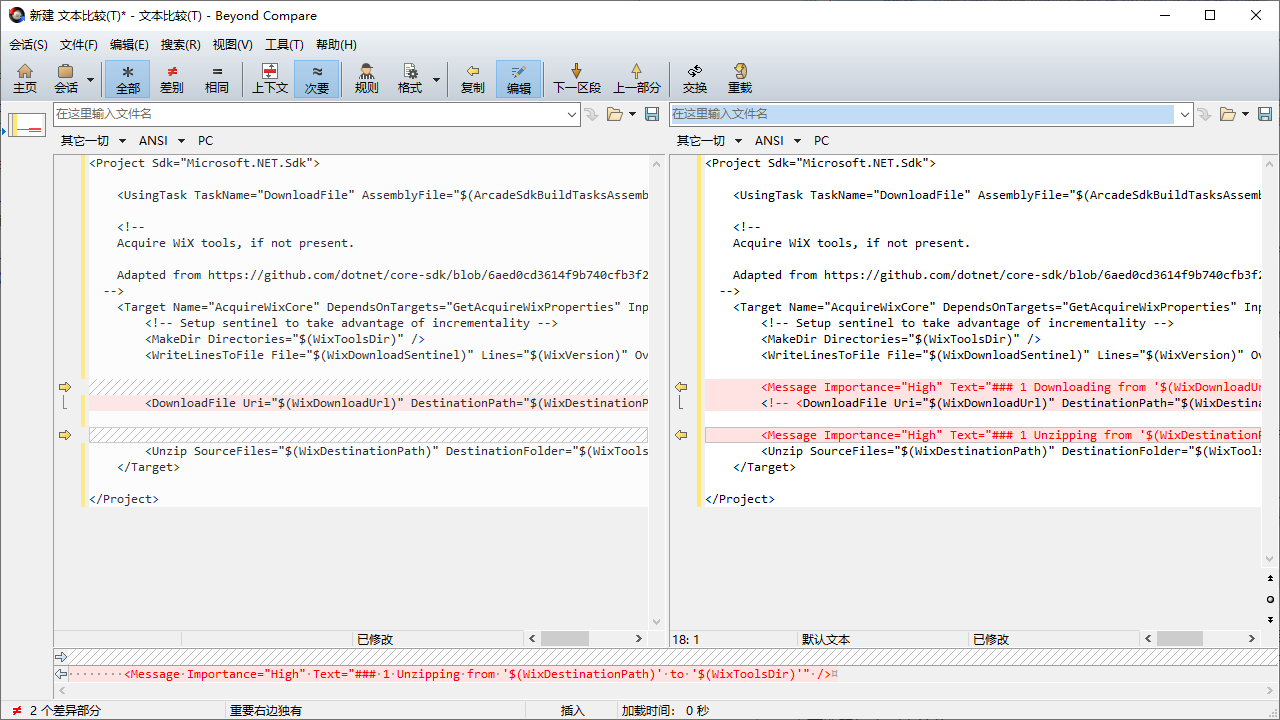 XML
XML<Project Sdk="Microsoft.NET.Sdk"> <UsingTask TaskName="DownloadFile" AssemblyFile="$(ArcadeSdkBuildTasksAssembly)" /> <!-- Acquire WiX tools, if not present. Adapted from https://github.com/dotnet/core-sdk/blob/6aed0cd3614f9b740cfb3f21fdb795bab53ef7e9/src/redist/targets/GenerateMSIs.targets#L80-L102 --> <Target Name="AcquireWixCore" DependsOnTargets="GetAcquireWixProperties" Inputs="$(WixDownloadSentinel)" Outputs="$(WixDestinationPath)"> <!-- Setup sentinel to take advantage of incrementality --> <MakeDir Directories="$(WixToolsDir)" /> <WriteLinesToFile File="$(WixDownloadSentinel)" Lines="$(WixVersion)" Overwrite="true" Encoding="Unicode" /> <Message Importance="High" Text="### 1 Downloading from '$(WixDownloadUrl)' to '$(WixDestinationPath)'" /> <!-- <DownloadFile Uri="$(WixDownloadUrl)" DestinationPath="$(WixDestinationPath)" Overwrite="true" /> --> <Message Importance="High" Text="### 1 Unzipping from '$(WixDestinationPath)' to '$(WixToolsDir)'" /> <Unzip SourceFiles="$(WixDestinationPath)" DestinationFolder="$(WixToolsDir)" /> </Target> </Project>再次重新执行
./build.cmd -rc Release,出现错误提示(nuget.exe 下载不下来):TextC:\Users\a8201\.nuget\packages\microsoft.dotnet.build.tasks.installers\6.0.0-beta.21522.3\build\acquisition\acquire-nuget-exe\acquire-nuget-exe.proj(11,9): error MSB4018: “DownloadFile”任务意外失败。 ...根据提示,打开
acquire-nuget-exe.proj文件,找到DownloadFile节点,在上方添加:XML<Message Importance="High" Text="### 2 Downloading from '$(NuGetExeDownloadUrl)' to '$(NuGetExeFile)'" />再次执行
./build.cmd -rc Release,根据输出提示,我们拿到 nuget.exe 的下载链接,手工下载文件,并将该文件复制一份到目标路径下,然后再次修改acquire-nuget-exe.proj文件: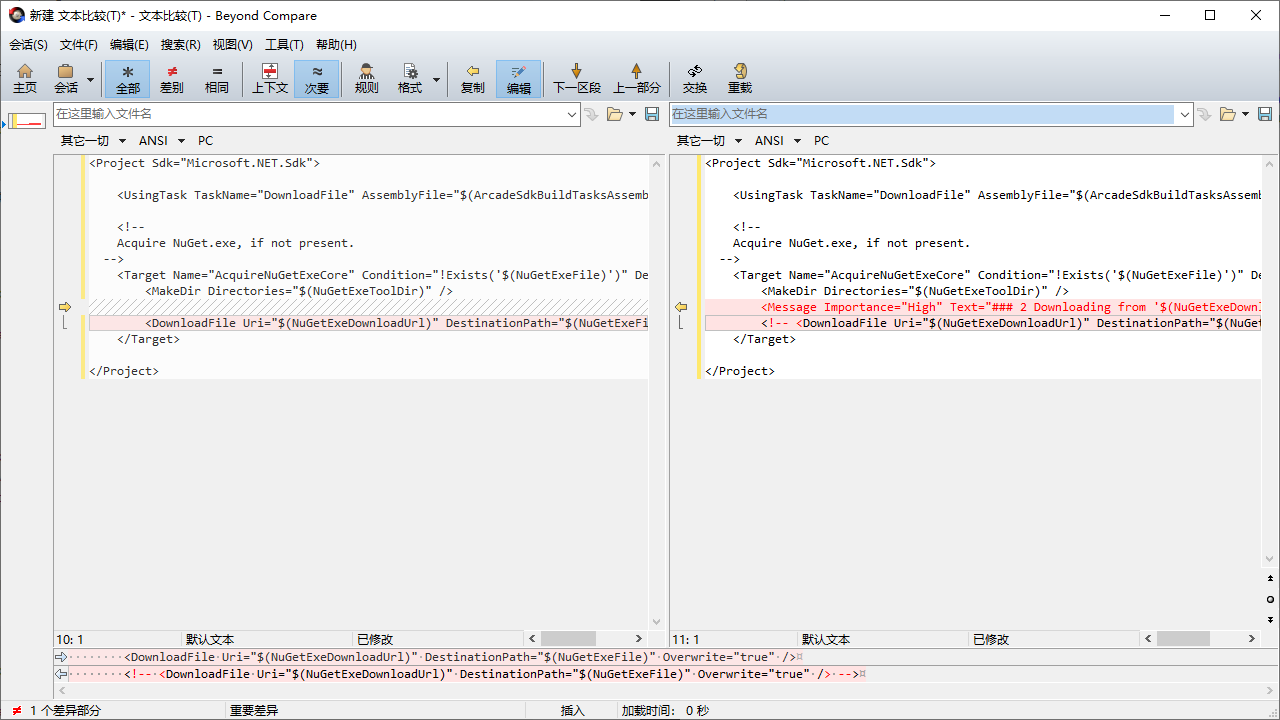 XML
XML<Project Sdk="Microsoft.NET.Sdk"> <UsingTask TaskName="DownloadFile" AssemblyFile="$(ArcadeSdkBuildTasksAssembly)" /> <!-- Acquire NuGet.exe, if not present. --> <Target Name="AcquireNuGetExeCore" Condition="!Exists('$(NuGetExeFile)')" DependsOnTargets="_GetAcquireNuGetExeProperties"> <MakeDir Directories="$(NuGetExeToolDir)" /> <Message Importance="High" Text="### 2 Downloading from '$(NuGetExeDownloadUrl)' to '$(NuGetExeFile)'" /> <!-- <DownloadFile Uri="$(NuGetExeDownloadUrl)" DestinationPath="$(NuGetExeFile)" Overwrite="true" /> --> </Target> </Project>此时参考以上解决思路,重复折腾个几轮(肝了两天),顺利的话就能编译成功了。不过为了自己同时也造福大家,这里总结归纳了后续需要操作的步骤:
将以上下载的
Microsoft.Signed.Wix-1.0.0-v3.14.0.5722.zip和NuGet.exe文件,分别放到WixTools.1.0.0-v3.14.0.5722和nuget文件夹下:
然后再同时选中以上两个文件夹,复制,分别粘贴到以下几个目录(全部都要):
Textruntime\artifacts\obj\dotnet-host runtime\artifacts\obj\dotnet-hostfxr runtime\artifacts\obj\Microsoft.NETCore.App.Bundle runtime\artifacts\obj\Microsoft.NETCore.App.Host runtime\artifacts\obj\Microsoft.NETCore.App.Ref runtime\artifacts\obj\Microsoft.NETCore.App.Runtime此时再执行 build 命令,就能一顺到底了
2 其它可能遇到的问题
执行 ./build.cmd -rc Release 命令的过程中可能遇到如下错误:
Text
D:\01_Computer\10_Projects\VisualStudio\runtime\.dotnet\sdk\6.0.100\Sdks\NuGet.Build.Tasks.Pack\build\NuGet.Build.Tasks.Pack.targets(221,5): error NU5118: 未添加文件“D:\01_Computer\10_Projects\VisualStudio\runtime\artifacts\bin\coreclr\windows.x64.Release\PDB\crossgen2.pdb”,因为包已包含文件“runtimes\win-x64\lib\net6.0\..\..\..\..\tools\crossgen2.pdb” [D:\01_Computer\10_Projects\VisualStudio\runtime\src\installer\pkg\sfx\Microsoft.NETCore.App\Microsoft.NETCore.App.Crossgen2.sfxproj]重启电脑后执行 ./build.cmd -clean 命令,再重新执行 build 命令即可